


In a working world of cloud apps, remote work, and embedded AI, trust is a vulnerability. Zero Trust makes “who, what, where, when, and how” part of every access decision, so one stolen password doesn’t become a master key to everything else.
Think about your office. You lock the front door, perhaps check badges or biometrics at reception, but do you let anyone wander into the finance room or the server cupboard once they’re inside? Traditional networks often did exactly that: a single login unlocked far too much. Zero Trust changes the default: never trust, always verify – for every user, device, app, and session.
This isn’t an enterprise‑only strategy anymore. With modern cloud tools and built‑in security, Zero Trust is now both achievable and proportionate for smaller teams. The focus: least‑privilege access and micro‑segmentation to contain damage and protect what matters most.

Why “Trusted by Default” No Longer Works
The old model assumed anything inside the network was safe. That ignores:
- Stolen credentials (often from phishing, still the starting point for the majority of successful attacks),
- Malicious or careless insiders, and
- Malware that’s already inside the perimeter.
Once in, attackers can move laterally with little resistance. Zero Trust flips the model: treat every request as untrusted until proven otherwise, and protect data and resources rather than locations.
The Two Network Pillars: Least Privilege & Micro‑segmentation
- Least privilege access
People and systems get only the minimum access required and ideally only for as long as they need it. Your marketing assistant doesn’t need the finance share; your accounting platform doesn’t need to talk to design workstations. - Micro‑segmentation
Break your environment into smaller, isolated zones. If guest Wi‑Fi is compromised, it shouldn’t be a stepping stone to your finance database or line‑of‑business apps. Segmentation limits blast radius and buys you time.
The 2026 Twist: Unsanctioned Cloud Apps and Shadow AI
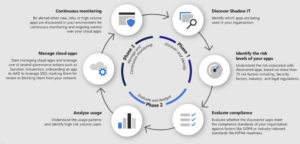
Unsanctioned cloud apps aren’t new – but scale and invisibility are. Microsoft’s shadow IT guidance notes that while many organisations think employees use “30 or 40” apps, the average is over 1,000. It also estimates around 80% of employees use tools that haven’t been formally approved.
Now add AI embedded inside everyday apps. The Cloud Security Alliance has highlighted how AI features increasingly hide in plain sight – you can face shadow AI risk without anyone signing up for a new tool. In related research, 54% of employees say they would use AI even without authorisation, and IBM’s 2025 AI Security Report found that 13% of organisations had experienced breaches of AI models or applications, and 97% of those incidents occurred in environments that lacked proper AI access controls.
The lesson? This isn’t just a governance annoyance – it’s a measurable risk. And the old “block it and move on” approach rarely works, because people will simply find another workaround.
Don’t Start with Blocking – Start with Visibility
If blocking is your first move, two things usually happen:
- People get better at hiding what they’re doing.
- They switch to a different (possibly worse) tool.
A better approach is discover → analyse → decide → enforce, with clear alternatives and communication.
A Practical Workflow (Run Quarterly or Continuously)
- Discover what’s actually in use
Build a real inventory using the signals you already collect: endpoint telemetry, identity logs, network/DNS data, and browser activity. - Analyse usage patterns
Look at who’s using what, admin behaviour, public/personal sharing, and legacy access (e.g., ex‑staff with lingering connections). - Score and prioritise risk
Consider data sensitivity, sharing patterns, identity controls, admin visibility, and whether AI features could be ingesting data. - Tag apps
Make decisions repeatable: sanctioned, restricted, or unsanctioned. Clear tags help you filter, track progress, and act consistently. - Take action with guardrails
Approve, restrict, warn, or block – but pair any blocking with communication and a supported alternative so productivity isn’t hit.

A Step‑by‑Step Zero Trust Roadmap for Small Businesses
You don’t need to “do Zero Trust everywhere” on day one. Start with a protect surface: a small set of critical systems, data, and workflows where you can deliver real risk reduction quickly.
Common protect surfaces to begin with:
- Identity and email
- Finance and payment systems
- Client data repositories
- Remote access pathways
- Admin accounts & management tools
Phase 1 – Start with Identity
- Enforce MFA everywhere (especially admin roles)
- Disable weak sign‑in paths and legacy protocols
- Separate admin accounts from day‑to‑day accounts
Phase 2 – Bring Devices into the Decision
- Baseline: patching, disk encryption, endpoint protection
- Require compliant devices for sensitive apps/data
- Set a clear BYOD policy (limited, conditional access, not a free pass)
Phase 3 – Fix Access
- Remove broad “everyone” access and shared logins
- Move to role‑based access (job roles = defined bundles)
- Require extra verification for admin elevation – and log it
Phase 4 – Lock Down Apps and Data
- Tighten sharing defaults; reduce public links
- Apply stronger sign‑in checks to high‑risk apps
- Assign accountable owners for critical systems and datasets
Phase 5 – Assume Breach with Segmentation
- Segment critical systems away from general users
- Restrict admin pathways to management tools
- Reduce lateral movement routes between zones
Phase 6 – Add Visibility and Response
- Centralise sign‑in, endpoint, and critical app alerts
- Define what “suspicious” looks like for your protect surface
- Create a simple response playbook (who does what, when)
Tools That Make This Manageable
- Identity & Access Management
Use built‑in controls in Microsoft 365 or Google Workspace: Conditional Access, risk‑based policies, device compliance checks, session controls, and admin protection. - Data and Sharing Controls
Tighten defaults, monitor public/personal sharing, and reduce anonymous links – particularly for finance, client, and HR data.
Culture, Communication, and Governance
Zero Trust is as much cultural as it is technical:
- Explain the why (protects people, clients, and the business)
- Document who needs access to what to do their job
- Review permissions quarterly and whenever roles change
- Communicate decisions on unsanctioned tools and offer supported alternatives

FAQs
Is Zero Trust too expensive for a small business?
No. The core controls – MFA, Conditional Access, device compliance – are built into common Microsoft 365 and Google Workspace plans. The main investment is in planning and configuration, not new hardware.
Does Zero Trust make life harder for employees?
It adds sensible checks, but modern SSO and adaptive MFA keep the experience smooth, only stepping up when risk is high.
Can we do this with a remote or hybrid team?
Yes. Zero Trust is location‑agnostic – it’s based on identity, device health, and context, not whether someone is “on the office network.”
How We Can Help
If you’d like support to define your protect surface, build a Zero Trust roadmap, or govern cloud and AI usage without slowing the business, get in touch for a Zero Trust. We’ll help you gain visibility, reduce exposure, and put safe, supported alternatives in place.